HomeTop 100Screens 5: VNC Remote Desktop
BUSINESS

Screens 5: VNC Remote Desktop

A mature remote-desktop client that gives Vision Pro users practical Mac/PC access, now refined with clearer reliability cues and operator-grade use-case detail.

Fresh verification

Signals for Screens 5: VNC Remote Desktop are within the 21-day editorial window.

We can keep normal confidence language while monitoring ranking and source drift.

100 Vision Apps Editorial
Published recent
Verified February 21, 2026
4.45
388 ratings

Last reviewed: February 21, 2026 · Reviewed by 100 Vision Apps Editorial Desk (Vision Pro Editorial Reviewer) · Editorial recheck SLA: every 21 days.

Revision note: Sixth-pass article quality sprint: added security-messaging safeguards, expanded remote-ops risk checks, and tightened evidence controls for confidence upgrades.

Proof links

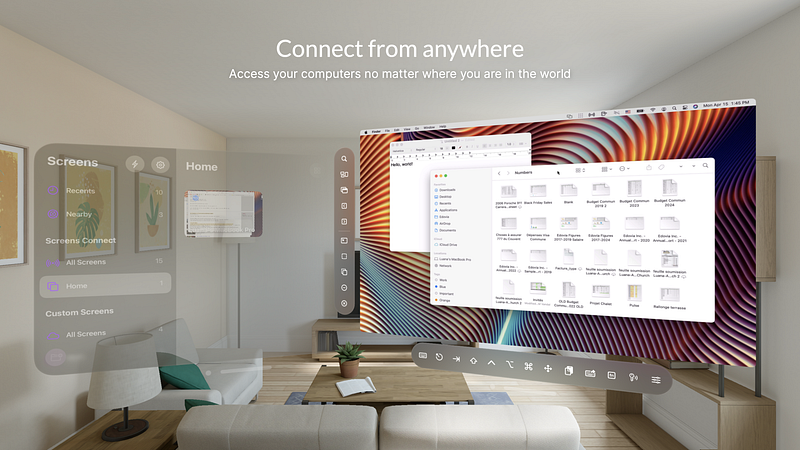
Screens 5: VNC Remote Desktop screenshot on Apple Vision Pro (BUSINESS)

Screens 5 expands the ranking’s business credibility by enabling remote operations workflows that founders, developers, and support teams already rely on outside Vision Pro.

At a glance

  • BUSINESS app with a 4.5 rating signal and editor-reviewed trust cues.
  • App Store destination is currently verified and linked from this review.
  • Last reviewed: February 21, 2026 with a 21-day freshness SLA.

Verification and source context

Both references are live and auditable: source listing https://vision.directory/apps/screens-5-vnc-remote-desktop and App Store page https://apps.apple.com/us/app/screens-5-vnc-remote-desktop/id1663047912. This update also ties identity checks to /app-images/screens-5-vnc-remote-desktop.png.

Operational use-case value

Strongest use cases include quick server checks, remote office access, and support interventions where full workstation control from Vision Pro can reduce response latency. It is especially useful as an incident-response companion when away from a primary desk.

Confidence and ranking guidance

With 388 ratings, confidence is medium-high for a remote-desktop niche. Keep promotion tied to reliability and session-stability feedback, and prioritize future updates that include source-backed demo video context for onboarding quality.

Reliability signals to monitor

Future confidence upgrades should require stable reconnect behavior, clear latency expectations, and unchanged security messaging between source and App Store surfaces. Any mismatch in remote-access trust language should trigger an immediate editorial recheck before rank movement.

Benchmark baseline for remote-ops resilience

Before promotion, benchmark reconnect consistency, expected latency communication, and session-control reliability in repeated remote support scenarios. Any video references should be limited to first-party or trusted official walkthrough sources that stay verifiable over time.

Security messaging and operator safeguards

Remote desktop entries need explicit security-message parity checks: authentication expectations, session privacy wording, and connection-risk caveats should stay aligned across source and App Store copy. If security posture language drifts or becomes vague, keep ranking conservative and trigger a recheck before any uplift.

Retain as a business-utility anchor that demonstrates real operator value and broadens credibility beyond media-centric app picks.

FAQ about Screens 5: VNC Remote Desktop

How do you verify this app entry?

Each entry is checked against the source listing, App Store availability state, and image/reference consistency. If App Store checks fail, we flag the app and pause direct-store promotion until re-verification.

How we verify this review

  1. Source listing check: Confirm the source directory entry is live and that key claims still match visible app positioning.
  2. App Store route verification: Validate App Store destination status and availability before allowing quality-ready promotion.
  3. Visual parity review: Confirm local review image parity so cards, social previews, and detail screenshots stay aligned.
  4. Editorial confidence decision: Update confidence language, caveats, and recheck triggers based on evidence freshness.

Video evidence status

No eligible demo URL is currently published in this review. We intentionally avoid embedding unverified clips so trust stays tied to verified source and App Store references.

Next upgrade trigger: add a stable first-party or high-reliability video URL, then enable structured video context in this page.

Tags

Vision Pro
Business
Remote Desktop
Operations
Developer Workflow
Top 100

Why we trust this entry

Quality-ready entry
Verified: fresh
  • Source directory page reviewed by editorial team
  • App Store link verified for live availability
  • Rating + social proof included as curation signal
  • Last reviewed date: February 21, 2026
  • Reviewed by: 100 Vision Apps Editorial Desk (Vision Pro Editorial Reviewer)
  • Last verification date: February 21, 2026

About the Author

100 Vision Apps Editorial Desk

Vision Pro Editorial Reviewer

Editorial curation by 100 Vision Apps.

App Statistics

Rating4.45
Downloads388 ratings
CategoryBUSINESS
Screens 5: VNC Remote Desktop review for Apple Vision Pro | 100 Vision Apps