A GTD-grade task system for Vision Pro with strong verification depth, serious planning power, and practical founder/operator utility for weekly execution loops.
Fresh verification
Signals for OmniFocus 4 are within the 21-day editorial window.
We can keep normal confidence language while monitoring ranking and source drift.
100 Vision Apps Editorial
Published recent
Verified February 21, 2026
4.08
304 ratings
Last reviewed: February 21, 2026 · Reviewed by 100 Vision Apps Editorial Desk (Vision Pro Editorial Reviewer) · Editorial recheck SLA: every 21 days.
OmniFocus 4 is one of the most credible productivity picks in this list because the source page (https://vision.directory/apps/omnifocus-4) and App Store listing (https://apps.apple.com/us/app/omnifocus-4/id1542143627) are both live, and user feedback volume is materially higher than most long-tail entries.
At a glance
PRODUCTIVITY app with a 4.1 rating signal and editor-reviewed trust cues.
App Store destination is currently verified and linked from this review.
Last reviewed: February 21, 2026 with a 21-day freshness SLA.
Practical use cases on Vision Pro
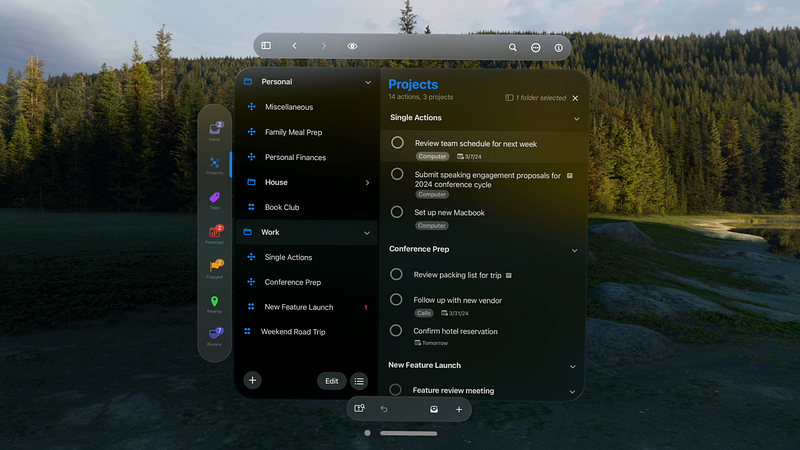
For founders and operators, OmniFocus maps cleanly to weekly planning, context-based prioritization, and deep-work sessions in mixed reality. It is strongest when used for project decomposition, next-action batching, and end-of-day review rituals instead of simple to-do capture. In onboarding flows, pair this recommendation with a quick methodology link so users understand why this app outranks lower-confidence task tools.
Verification and trust cues
This entry keeps clear verification rails: source profile at https://vision.directory/apps/omnifocus-4, canonical App Store destination at https://apps.apple.com/us/app/omnifocus-4/id1542143627, and local editorial visual assets. The 304-rating signal gives more confidence than low-sample alternatives in this category.
Editorial recommendation
Recommend OmniFocus 4 to users running multi-project workflows who care about reliability over novelty. In ranking terms, this is a durable shortlist candidate and a strong benchmark when comparing newer productivity apps with lower social proof.
Upgrade and downgrade triggers
Keep high-confidence status while source profile continuity, App Store route health, and release-note cadence remain aligned. Trigger a confidence downgrade if major workflow claims disappear from product surfaces, or if evidence drift appears between source positioning and currently observable planning capabilities.
Enterprise benchmark baseline
Use OmniFocus 4 as a calibration benchmark for productivity entries by measuring three controls: project decomposition clarity, weekly review reliability, and parity between source claims and currently verifiable planning features. Only lift competing lower-signal tools when they outperform this baseline across repeated checks.
Release-note evidence and walkthrough gate
For any rank increase, include at least one recent first-party release-note or changelog reference plus one trustworthy workflow walkthrough demonstrating real weekly planning use. Without both references, keep this entry high-confidence but freeze upward movement to avoid assumption-based momentum.
Keep OmniFocus 4 positioned as a trust-first productivity anchor, with explicit downgrade triggers and repeated evidence checks to preserve credibility over time.
OmniFocus 4 is included in our editorial ranking because it matches a clear use case in PRODUCTIVITY, includes trust signals, and is reviewed against source and App Store references before promotion.
We recommend OmniFocus 4 for users looking for productivity workflows on Vision Pro. The full review notes highlight practical fit, tradeoffs, and confidence level.
Each entry is checked against the source listing, App Store availability state, and image/reference consistency. If App Store checks fail, we flag the app and pause direct-store promotion until re-verification.
How we verify this review
Source listing check: Confirm the source directory entry is live and that key claims still match visible app positioning.
App Store route verification: Validate App Store destination status and availability before allowing quality-ready promotion.
Visual parity review: Confirm local review image parity so cards, social previews, and detail screenshots stay aligned.
Editorial confidence decision: Update confidence language, caveats, and recheck triggers based on evidence freshness.
Video evidence status
No eligible demo URL is currently published in this review. We intentionally avoid embedding unverified clips so trust stays tied to verified source and App Store references.
Next upgrade trigger: add a stable first-party or high-reliability video URL, then enable structured video context in this page.